
IReport incident reporting
Trust before visibility.
IReport lets you report what is happening around you with photos, video and audio. Every report is checked before anyone else sees it: an AI agent compares it against news, social media, official channels, nearby reports and media forensics, usually within 2 minutes. Control Room officers decide anything inconclusive or sensitive, and every appeal.
AI-first verification
Each report is checked against public sources and media forensics, usually within 2 minutes.
Humans decide the hard cases
Inconclusive or sensitive reports go to Control Room officers, and so does every appeal.
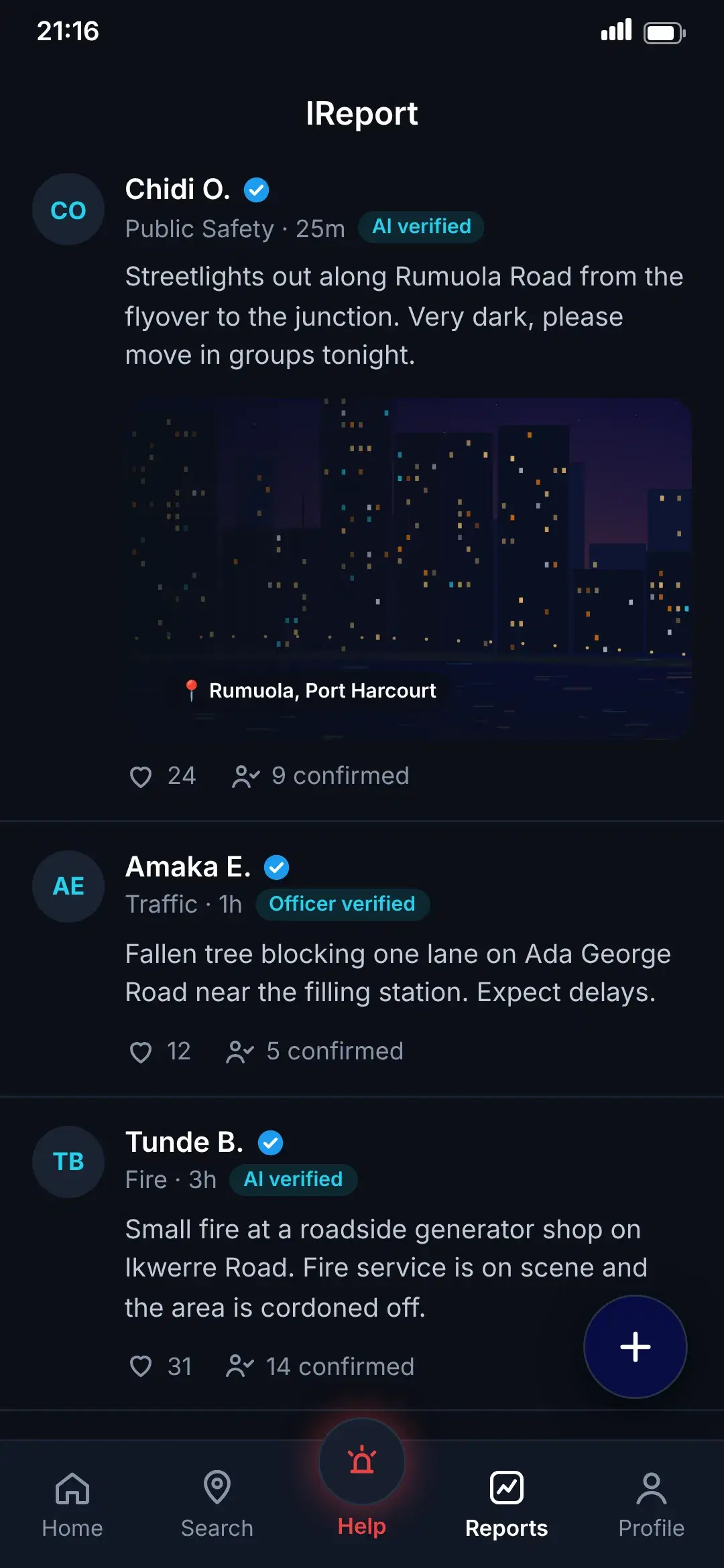
Only verified reports are public
The IReport feed shows verified reports only, so what you see is what has been checked.
Neighbours confirm
People nearby can confirm what they witnessed, which strengthens the report and their trust score.
How it works
- 1Describe the incident and attach photos, video or audio
- 2AI verification checks sources and media
- 3Officers review anything inconclusive or sensitive
- 4Verified reports appear in the feed
- 5Neighbours confirm what they saw

FAQ
IReport incident reporting: questions
Be ready before you need it.
Download RunKom, add your emergency contacts and know that help is a few taps away.
 Coming soon
 Coming soon
RunKom is launching soon on iOS and Android.